
File Manager
We want our customers to be confident and aware of our data collection practices when using File Manager.
Note
The content on this page is subject to change. We recommend that you check back quarterly for updates.
Data Management Practices
Through its different features, File Manager accesses, processes, and stores several kinds of data:
- Tenants
- Teams
- User data
- Tasks
Here is how we’re managing data for these different categories:
| Data | Accessed | Cached | Stored |
| Tenants | ✔ | 🚫 | ✔ |
| Tenant settings | ✔ | 🚫 | ✔ |
| Teams | ✔ | ✔ | ✔ |
| Teams channels | ✔ | ✔ | ✔ |
| Teams files | ✔ | ✔ | ✔ |
| User data | ✔ | 🚫 | 🚫 |
| Tasks | ✔ | 🚫 | ✔ |
Microsoft Graph
| Scope | Description | Justification | Admin Consent Required |
User.ReadBasic.All | Allows to read user’s name, first and last name, email address and photo | To retrieve signed-in user’s basic details. | No |
Files.ReadWrite.All | Allows to read, create, update and delete all files the signed-in user can access. | To perform file operations. | No |
Sites.ReadWrite.All | Allows the app to edit or delete documents and list items in all site collections on behalf of the signed-in user. | To perform SharePoint site’s lists and libraries operations | No |
Channel.ReadBasic.All | Allows to read channel names and channel descriptions, on behalf of the signed-in user. | To retrieve Team’s channels basic details. | No |
Team.ReadBasic.All | Allows to read the names and descriptions of teams, on behalf of the signed-in user. | To retrieve Team’s basic details. | No |
Microsoft Teams Apps Security And Compliance
To provide organizations with the information they need to accelerate and inform decisions about the Microsoft Teams apps and add-ins they use, Microsoft works with our Microsoft 365 developer partners. This information is supplemented by information from the Microsoft Cloud App Security app catalog and information provided by developers when they submit their apps. This security, data handling and compliance information is intended to help organizations assess and manage the risks of using these apps.
Note
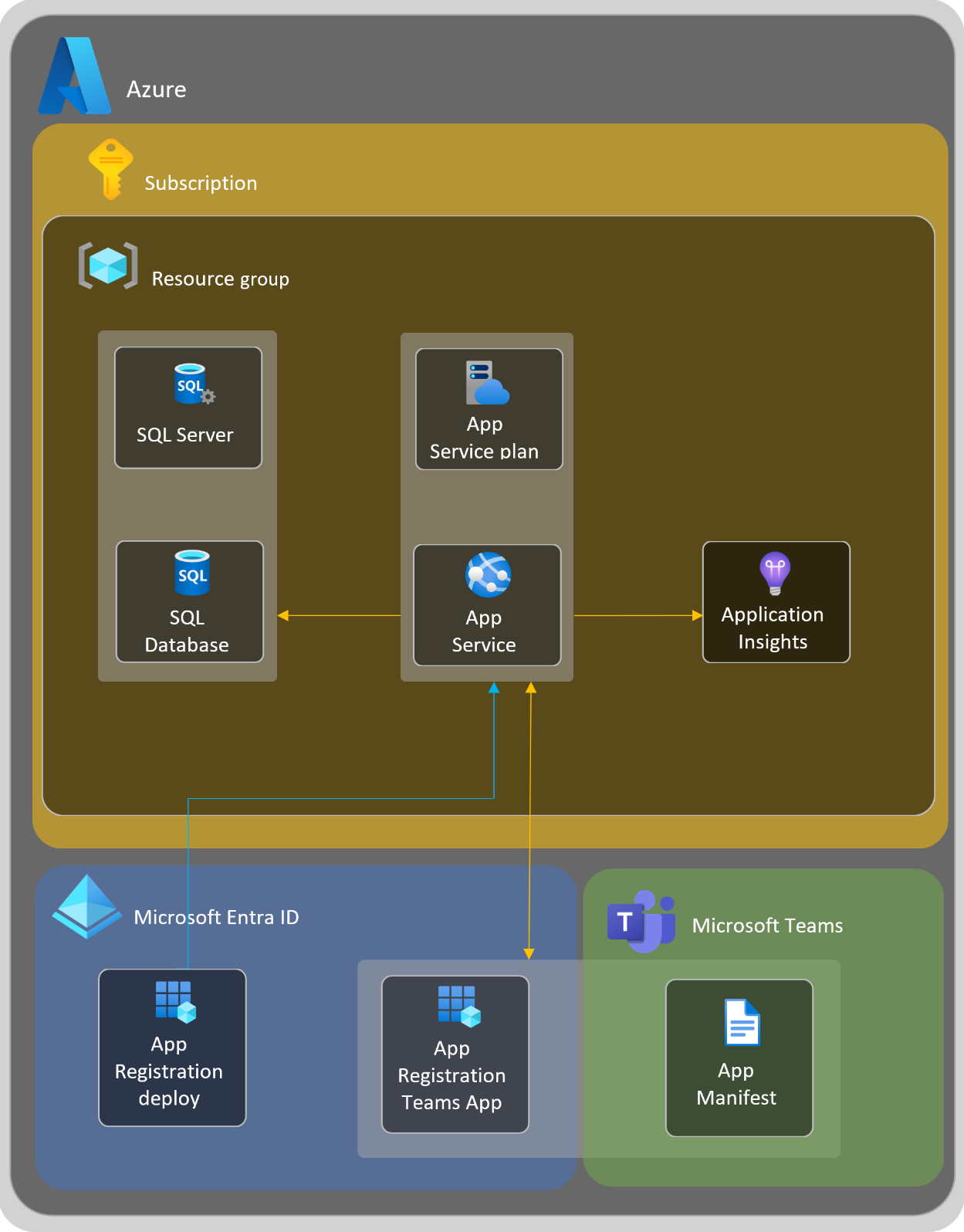
Architecture And Flow Diagram
Resource Endpoints
All the traffic from and to the File Manager platform uses HTTPS protocol on port 443. Here is a short description of each flow:
| Name | Comments |
| https://licensing.solutions2share.com/ | Licensing |
Dependencies
| Name | Version | Url | License |
| Microsoft.ApplicationInsights.AspNetCore | 2.17.0 | https://licenses.nuget.org/MIT | MIT |
| Microsoft.ApplicationInsights.Log4NetAppender | 2.17.0 | https://licenses.nuget.org/MIT | MIT |
| Microsoft.AspNetCore.SpaServices.Extensions | 3.1.8 | https://licenses.nuget.org/MIT | MIT |
| Microsoft.EntityFrameworkCore | 3.1.8 | https://licenses.nuget.org/MIT | MIT |
| Microsoft.EntityFrameworkCore.SqlServer | 3.1.8 | https://licenses.nuget.org/MIT | MIT |
| Microsoft.EntityFrameworkCore.Tools | 3.1.8 | https://licenses.nuget.org/MIT | MIT |
| Microsoft.Extensions.Caching.SqlServer | 6.0.4 | https://licenses.nuget.org/MIT | MIT |
| log4net | 2.0.11 | https://licenses.nuget.org/Apache-2.0 | Apache-2.0 |
| Microsoft.Graph | 3.15.0 | https://www.nuget.org/packages/Microsoft.Graph/5.0.0-preview.14/License | MS |
| Microsoft.Identity.Client | 4.19.0 | https://licenses.nuget.org/MIT | MIT |
| Microsoft.Extensions.Configuration.UserSecrets | 3.1.8 | https://licenses.nuget.org/MIT | MIT |
| Microsoft.Graph.Core | 1.21.0 | https://www.nuget.org/packages/Microsoft.Graph.Core/3.0.0-preview.17/License | MS |
| System.IdentityModel.Tokens.Jwt | 6.7.1 | https://licenses.nuget.org/MIT | MIT |
| Microsoft.EntityFrameworkCore.Sqlite | 3.1.8 | https://licenses.nuget.org/MIT | MIT |