
Governance Autopilot
Governance Autopilot reads a Microsoft 365 tenant’s configuration and activity signals through Microsoft Graph using read-only, admin-consented application permissions, evaluates them against a catalog of governance policies, and stores the derived results in Solutions2Share-operated Azure services — it never modifies a customer’s tenant data.
Microsoft 365 Certified
Governance Autopilot is a new Solutions2Share product and is not yet Microsoft 365 Certified. Solutions2Share intends to complete Microsoft 365 App Certification as part of the product roadmap. Until certification is granted, the application is developed under the Microsoft Security Development Lifecycle and the practices described on this page.
Data Management Practices
All data is processed on behalf of the customer’s tenant and is isolated per tenant (see Architecture And Flow Diagram). Governance Autopilot performs read-only collection; it does not write to, or change, any customer tenant data. Data is stored in Microsoft Azure data centres operated by Solutions2Share in the Germany West Central (EU) region; the web front-ends are served from the West Europe (EU) region. No customer data leaves the EU.
The application accesses, processes and stores the following data types:
Identity & directory data
User accounts, groups and group memberships, directory roles, and organisation properties. Storage & retention: stored in Azure SQL Database. Current values are kept for the duration of the customer’s subscription; historical versions are retained to show governance trends over time (see Change history below). All customer data is retained for the duration of the subscription and deleted when the subscription ends.
Microsoft Teams collaboration data
Microsoft Teams channels — names, descriptions and membership — used to inventory workspaces and detect ownerless or guest-heavy collaboration. Message content is not read. Storage & retention: stored in Azure SQL Database; same retention as above.
SharePoint & files metadata
SharePoint site inventory and file/site metadata used for storage-hygiene analysis. Governance Autopilot does not extract or retain document contents. Storage & retention: stored in Azure SQL Database; same retention as above.
Audit logs
Directory and sign-in audit logs, used to detect stale sign-ins and gaps in audit configuration. Storage & retention: raw crawl output is first written to an Azure Data Lake per tenant, then merged into Azure SQL Database; same retention as above.
Tenant configuration & policy
Conditional Access and authorization policies, directory role assignments (RBAC), access-review definitions and decisions, and application / service-principal registrations — read to evaluate governance posture. Storage & retention: stored in Azure SQL Database; same retention as above.
Governance analysis results
Derived scores, policy findings, recommendations and analysis snapshots — computed by Governance Autopilot, not read from the tenant. Storage & retention: stored in Azure SQL Database for the life of the subscription. Shareable report links are optional and time-limited (default 14 days, maximum 90 days).
Signed-in administrator identity
Display name, email/UPN, object ID and tenant ID of the administrator who signs in, used to establish identity and gate access. Storage & retention: stored in Azure SQL Database for the life of the subscription.
Change history. Configuration data is versioned (slowly-changing-dimension history) so the product can show how a tenant’s governance posture changes over time. Immutable audit events are appended, not overwritten.
Microsoft Graph
Governance Autopilot uses the Microsoft Graph permissions listed below, on a single multi-tenant Microsoft Entra app registration. Tenant data collection uses read-only application permissions; a tenant administrator grants consent once and background analysis then runs with no user present. The only delegated permission is User.Read, used solely to sign the administrator in — the browser never receives a Microsoft Graph token for tenant data. Scope names are verbatim from the app registration and are rendered as code.
| Scope | Description | Justification | Admin Consent Required | Type |
|---|---|---|---|---|
AccessReview.Read.All | Read all access reviews. | Evaluate access-review coverage and outcomes. | Yes | Application |
Application.Read.All | Read all applications. | Detect over-privileged app registrations and service principals. | Yes | Application |
AuditLog.Read.All | Read all audit log data. | Detect stale sign-ins and gaps in audit configuration. | Yes | Application |
Channel.ReadBasic.All | Read the names and descriptions of all channels. | Inventory Microsoft Teams channels for workspace governance. | Yes | Application |
ChannelMember.Read.All | Read the members of all channels. | Detect guest and membership sprawl in Teams channels. | Yes | Application |
Directory.Read.All | Read directory data. | Read organisation, roles and directory objects underpinning identity-governance checks. | Yes | Application |
Files.Read.All | Read files in all site collections. | Analyse file and site metadata for storage-hygiene governance. | Yes | Application |
Group.Read.All | Read all groups. | Inventory Microsoft 365 groups and Teams for lifecycle, ownership and naming analysis. | Yes | Application |
Policy.Read.All | Read your organization’s policies. | Evaluate Conditional Access, authorization and external-sharing policy posture. | Yes | Application |
RoleManagement.Read.Directory | Read all directory RBAC settings. | Detect standing privileged access and separation-of-duties conflicts. | Yes | Application |
Sites.Read.All | Read items in all site collections. | SharePoint site inventory and storage/structure analysis. | Yes | Application |
User.Read | Sign in and read user profile. | Sign the administrator in and establish their identity in the app. | No | Delegated |
User.Read.All | Read all users’ full profiles. | Inventory user accounts to detect stale, disabled, unlicensed and guest identities. | Yes | Application |
Full descriptions of each permission are published in the Microsoft Graph permissions reference.
SharePoint / other workload permissions
Not applicable in the current release. Governance Autopilot reads SharePoint data through Microsoft Graph (Sites.Read.All, Files.Read.All) only. A future release may add advanced external-sharing checks that require a SharePoint tenant-administration read permission with certificate-based application-only authentication; this is planned and not used today.
Microsoft Teams Apps Security And Compliance
Not applicable. Governance Autopilot is a web application. It is not distributed as a Microsoft Teams app and does not run inside Microsoft Teams.
Architecture And Flow Diagram
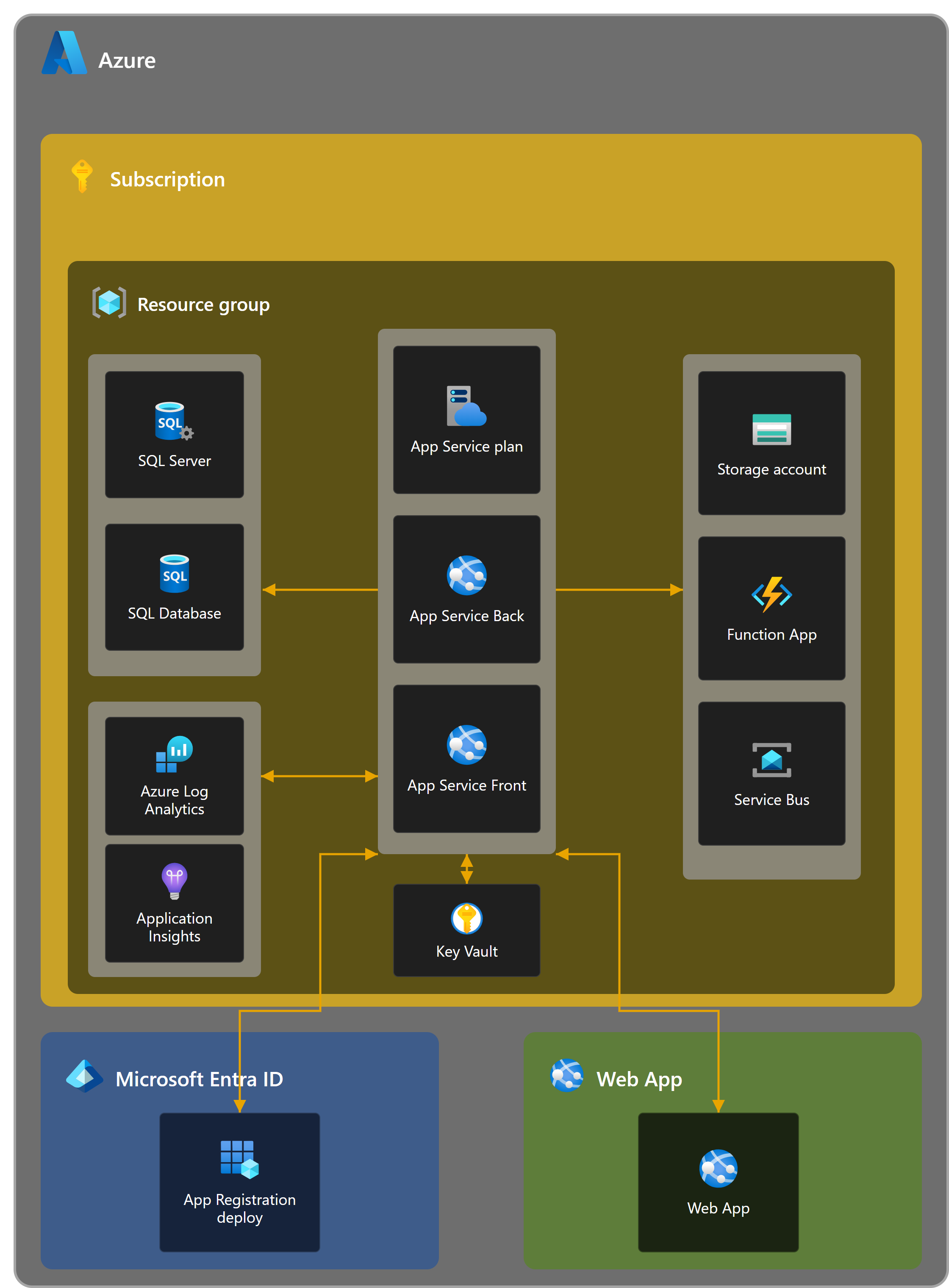
Data flow: (1) the tenant administrator signs in to App Service Front (the web front-end), which calls App Service Back (the Governance API); (2) App Service Back validates the product entitlement with the Solutions2Share License Management Center and enqueues an analysis on Service Bus; (3) the Function App reads the customer’s Microsoft 365 tenant through Microsoft Graph (read-only, application-only) and writes raw data to the Storage account; (4) the data is merged into Azure SQL (staging → history) and scored against the governance policies; (5) App Service Back reads the results back for App Service Front. All compute emits telemetry to Application Insights and Log Analytics.
Governance Autopilot uses a hybrid authentication model on one multi-tenant Microsoft Entra app registration, with three deliberately separated flows:
- Sign-in (delegated). The administrator signs in with their Microsoft work account. The app establishes identity only — no Microsoft Graph permission is requested at sign-in.
- Consent (application). The administrator grants the read-only Graph application permissions once. Consent is a governed, manual step and is never performed automatically.
- Analysis (application-only). Background workers authenticate to Microsoft Graph using a certificate held in Azure Key Vault (no shared client secret) and read tenant data. The browser never receives a Graph token.
Per-tenant isolation is enforced by the tenant identifier carried in every token; tokens and data cannot cross tenants.
Resource Endpoints
Domains that a customer’s network or browser must be able to reach.
| Name | Comments |
|---|---|
login.microsoftonline.com | Microsoft Entra ID — administrator sign-in and OAuth token issuance (browser and backend). |
fonts.googleapis.com | Google Fonts stylesheet for the web UI (browser). |
fonts.gstatic.com | Google Fonts font files (browser). |
governance-autopilot.solutions2share.com | The Governance Autopilot web UI and its API (browser). |
Backend service egress (informational)
Outbound calls made by the Solutions2Share-operated backend. These are not customer-configurable and are listed for transparency.
| Name | Comments |
|---|---|
graph.microsoft.com | Microsoft Graph — read-only tenant data collection (application-only). |
s2slicensing.azurewebsites.net | Solutions2Share License Management Center — product entitlement validation. |
*.database.windows.net | Azure SQL Database — analysis storage. |
*.vault.azure.net | Azure Key Vault — Graph signing certificate retrieval. |
*.blob.core.windows.net, *.dfs.core.windows.net | Azure Storage / Data Lake — raw crawl data. |
Dependencies
Third-party libraries used by Governance Autopilot. Versions reflect the current release.
Server
| Name | Version | Url | License |
|---|---|---|---|
| Azure.Identity | 1.13.1 | licenses.nuget.org/MIT | MIT |
| Azure.Security.KeyVault.Certificates | 4.7.0 | licenses.nuget.org/MIT | MIT |
| Azure.Security.KeyVault.Secrets | 4.8.0 | licenses.nuget.org/MIT | MIT |
| Azure.Messaging.ServiceBus | 7.19.0 | licenses.nuget.org/MIT | MIT |
| Azure.Storage.Files.DataLake | 12.24.0 | licenses.nuget.org/MIT | MIT |
| Microsoft.Graph | 5.95.0 | licenses.nuget.org/MIT | MIT |
| Microsoft.Graph.Core | 3.2.4 | licenses.nuget.org/MIT | MIT |
| Microsoft.Identity.Web | 4.0.1 | licenses.nuget.org/MIT | MIT |
| Microsoft.Identity.Client | 4.78.0 | licenses.nuget.org/MIT | MIT |
| Microsoft.Identity.Client.Extensions.Msal | 4.78.0 | licenses.nuget.org/MIT | MIT |
| Microsoft.EntityFrameworkCore | 8.0.22 | licenses.nuget.org/MIT | MIT |
| Microsoft.EntityFrameworkCore.Relational | 8.0.22 | licenses.nuget.org/MIT | MIT |
| Microsoft.EntityFrameworkCore.SqlServer | 8.0.22 | licenses.nuget.org/MIT | MIT |
| Microsoft.EntityFrameworkCore.InMemory | 8.0.22 | licenses.nuget.org/MIT | MIT |
| Microsoft.EntityFrameworkCore.Design | 8.0.22 | licenses.nuget.org/MIT | MIT |
| Microsoft.EntityFrameworkCore.Tools | 8.0.22 | licenses.nuget.org/MIT | MIT |
| Microsoft.Extensions.Configuration.AzureAppConfiguration | 8.4.0 | licenses.nuget.org/MIT | MIT |
| Microsoft.ApplicationInsights.WorkerService | 2.23.0 | licenses.nuget.org/MIT | MIT |
| Microsoft.Azure.Functions.Worker | 2.51.0 | licenses.nuget.org/MIT | MIT |
| Microsoft.Azure.Functions.Worker.ApplicationInsights | 2.50.0 | licenses.nuget.org/MIT | MIT |
| Microsoft.Azure.Functions.Worker.Extensions.Http.AspNetCore | 2.1.0 | licenses.nuget.org/MIT | MIT |
| Microsoft.Azure.Functions.Worker.Sdk | 2.0.7 | licenses.nuget.org/MIT | MIT |
| AutoMapper | 16.1.1 | licenses.nuget.org/MIT | MIT |
| Newtonsoft.Json | 13.0.4 | licenses.nuget.org/MIT | MIT |
| QuestPDF | 2026.2.3 | licenses.nuget.org/MIT | MIT (Community) |
| Swashbuckle.AspNetCore | 6.6.2 | licenses.nuget.org/MIT | MIT |
| System.ComponentModel.Annotations | 5.0.0 | licenses.nuget.org/MIT | MIT |
Client Packages
| Name | Version | Url | License |
|---|---|---|---|
| @azure/msal-browser | 5.10.0 | npmjs.com/package/@azure/msal-browser | MIT |
| @azure/msal-react | 5.4.0 | npmjs.com/package/@azure/msal-react | MIT |
| @radix-ui/react-slot | 1.2.5 | npmjs.com/package/@radix-ui/react-slot | MIT |
| @react-pdf/renderer | 4.5.1 | npmjs.com/package/@react-pdf/renderer | MIT |
| @reduxjs/toolkit | 2.11.2 | npmjs.com/package/@reduxjs/toolkit | MIT |
| @tanstack/react-query | 5.100.6 | npmjs.com/package/@tanstack/react-query | MIT |
| axios | 1.16.0 | npmjs.com/package/axios | MIT |
| class-variance-authority | 0.7.1 | npmjs.com/package/class-variance-authority | Apache-2.0 |
| clsx | 2.1.1 | npmjs.com/package/clsx | MIT |
| framer-motion | 12.38.0 | npmjs.com/package/framer-motion | MIT |
| i18next | 26.0.10 | npmjs.com/package/i18next | MIT |
| lucide-react | 1.8.0 | npmjs.com/package/lucide-react | ISC |
| react | 19.2.4 | npmjs.com/package/react | MIT |
| react-dom | 19.2.4 | npmjs.com/package/react-dom | MIT |
| react-i18next | 17.0.7 | npmjs.com/package/react-i18next | MIT |
| react-redux | 9.2.0 | npmjs.com/package/react-redux | MIT |
| react-router-dom | 7.13.1 | npmjs.com/package/react-router-dom | MIT |
| tailwind-merge | 3.6.0 | npmjs.com/package/tailwind-merge | MIT |
Build and test tooling
Used only to build and test the app; not shipped to the browser.
| Name | Version | Url | License |
|---|---|---|---|
| vite | 7.3.1 | npmjs.com/package/vite | MIT |
| @vitejs/plugin-react | 4.7.0 | npmjs.com/package/@vitejs/plugin-react | MIT |
| vitest | 4.1.5 | npmjs.com/package/vitest | MIT |
| @vitest/coverage-v8 | 4.1.5 | npmjs.com/package/@vitest/coverage-v8 | MIT |
| @playwright/test | 1.59.1 | npmjs.com/package/@playwright/test | Apache-2.0 |
| @testing-library/react | 16.3.2 | npmjs.com/package/@testing-library/react | MIT |
| @testing-library/jest-dom | 6.9.1 | npmjs.com/package/@testing-library/jest-dom | MIT |
| @testing-library/user-event | 14.6.1 | npmjs.com/package/@testing-library/user-event | MIT |
| jsdom | 29.1.1 | npmjs.com/package/jsdom | MIT |
| msw | 2.14.6 | npmjs.com/package/msw | MIT |
| tailwindcss | 4.2.1 | npmjs.com/package/tailwindcss | MIT |
| @tailwindcss/vite | 4.2.1 | npmjs.com/package/@tailwindcss/vite | MIT |
| oxlint | 1.69.0 | npmjs.com/package/oxlint | MIT |
| oxfmt | 0.54.0 | npmjs.com/package/oxfmt | MIT |
| size-limit | 11.2.0 | npmjs.com/package/size-limit | MIT |
| @size-limit/preset-app | 11.2.0 | npmjs.com/package/@size-limit/preset-app | MIT |
| @typescript/native-preview | 7.0.0-dev | npmjs.com/package/@typescript/native-preview | Apache-2.0 |
| @types/node | 24.12.0 | npmjs.com/package/@types/node | MIT |
| @types/react | 19.2.14 | npmjs.com/package/@types/react | MIT |
| @types/react-dom | 19.2.3 | npmjs.com/package/@types/react-dom | MIT |
Governance Autopilot uses no third-party analytics or advertising trackers. At runtime, customer data is sent only to Microsoft/Azure services and the Solutions2Share License Management Center; web fonts are loaded from the Google Fonts CDN (fonts.googleapis.com, fonts.gstatic.com).