
Policy Enforcer
Policy Enforcer watches the Microsoft 365 groups and Teams that Teams Manager governs, detects changes that break your governance policies, and resolves them automatically or routes them to a reviewer in Microsoft Teams. It reads change events from the Microsoft Entra directory audit log through Microsoft Graph, compares them with the policies defined in Teams Manager, and — only where an administrator has configured an automatic resolution — restores the last known-good value in the customer’s tenant. All processing runs in Solutions2Share-operated Azure services in the EU.
Data Management Practices
All data is processed on behalf of the customer’s tenant and is isolated per tenant (see Architecture And Flow Diagram). Policy Enforcer is an add-on to Teams Manager: it reads policy definitions and governed spaces from Teams Manager read-only and never writes to Teams Manager. All Policy Enforcer services and data stores are hosted in Microsoft Azure data centres operated by Solutions2Share in the Germany West Central (EU) region. Sign-in, Microsoft Graph and the Azure Bot Service that delivers Teams messages are Microsoft 365 / Azure global services.
Policy Enforcer does not read chat or channel message content, e-mail, or document content.
The application accesses, processes and stores the following data types:
Governance configuration
Policy definitions and governed spaces (Microsoft 365 group ID, display name, template name and Teams Manager metadata values) read from the customer’s Teams Manager instance, plus the list of Teams Manager administrators (object ID, UPN or e-mail address) used to decide who may administer Policy Enforcer. Storage & retention: stored in Azure SQL Database as a snapshot that is refreshed every 30 minutes; retained for the duration of the subscription.
Group change events and violations
Group-management events from the directory audit log for governed spaces only: the changed property (team name, visibility, sensitivity label, owners, members), its old and new value, and the actor who made the change (UPN, or application name for app-made changes). A detected policy violation is stored together with its resolution state, the reviewer who resolved it (object ID) and an optional reviewer comment. Storage & retention: stored in Azure SQL Database for the duration of the subscription.
Known-good baselines
The last compliant value of each monitored property per governed space (for example the approved team name or sensitivity label), used to restore the value after a violation. Storage & retention: stored in Azure SQL Database for the duration of the subscription.
Planner and OneNote names
The titles of Planner plans and the names of OneNote notebooks that belong to governed groups. Plan tasks and notebook pages are not read. Storage & retention: only the changed names are stored, as part of a violation (see above).
Directory profile data (read on demand)
Display name, e-mail address, UPN and profile photo of users, and the owners and members of governed groups — read on demand to show names in the app and in notifications and to determine who must review a violation. Storage & retention: not stored; profile photos are cached in memory for at most one hour.
Microsoft Teams notification data
To send adaptive-card notifications, Policy Enforcer stores the Teams conversation reference of the Policy Enforcer bot for each recipient and a delivery record per card (recipient object ID, Teams message ID, delivery status). Storage & retention: stored in Azure SQL Database for the duration of the subscription.
Tenant and service-account data
Tenant ID and name, tenant settings and, if connected, the object ID of the service account used for delegated operations (see Microsoft Graph). The service account’s refresh token is encrypted at application level with AES-256-GCM, bound to the tenant ID; the encryption key is held in Azure Key Vault. Storage & retention: stored in Azure SQL Database for the duration of the subscription.
Diagnostic telemetry
Requests, dependency calls and errors from the web UI, API and background workers are sent to Azure Application Insights / Log Analytics in the same region. In the API and web UI telemetry, e-mail addresses, object IDs and authorization headers are redacted before they leave the process. Extended diagnostic logging of Microsoft Graph request and response bodies (capped at 16 KB, without authorization headers) is off by default and only enabled per tenant for troubleshooting. Storage & retention: 30 days.
Change detection is forward-only. Policy Enforcer starts evaluating changes from the moment a tenant is onboarded; it does not scan or report historical changes that happened before onboarding.
Microsoft Graph
Policy Enforcer uses one multi-tenant Microsoft Entra app registration. A tenant administrator grants admin consent once during onboarding. Detection and most resolutions run in the background with application permissions. A small number of operations that Microsoft Graph does not support with application permissions (changing a group’s sensitivity label, renaming a Planner plan, reading and renaming OneNote notebooks) run with delegated permissions of a dedicated service account that a tenant administrator connects during setup. Apart from installing its own Teams app for a reviewer who needs to receive a notification, Policy Enforcer only writes to the tenant to restore a governed group to its last known-good state after a policy violation — it never deletes groups, Teams, users, files or content. Scope names are the Microsoft Graph permission names, as shown on the consent screen, and are rendered as code.
| Scope | Description | Justification | Admin Consent Required | Type |
|---|---|---|---|---|
AuditLog.Read.All | Read all audit log data. | Read group-management events from the directory audit log to detect policy violations. | Yes | Application |
Group.ReadWrite.All | Read and write all groups. | Read governed groups; restore a group’s name or set its visibility back to private after a violation. | Yes | Application |
GroupMember.ReadWrite.All | Read and write all group memberships. | Read owners and members; re-add a required owner or member that was removed. | Yes | Application |
User.Read.All | Read all users’ full profiles. | Show user names in the app and in notifications; find the reviewers responsible for a governed space. | Yes | Application |
SensitivityLabels.Read.All | Read sensitivity labels. | Show sensitivity-label names instead of IDs in violations and notifications. | Yes | Application |
InformationProtectionPolicy.Read.All | Read all published labels and label policies for an organization. | Look up the approved sensitivity label before restoring it. | Yes | Application |
Tasks.Read.All | Read all tasks. | Detect renamed Planner plans in governed groups (plan titles only). | Yes | Application |
AppCatalog.Read.All | Read all app catalogs. | Find the Policy Enforcer app in the tenant’s Teams app catalog. | Yes | Application |
TeamsAppInstallation.ReadWriteSelfForUser.All | Allow the Teams app to manage itself for all users. | Install the Policy Enforcer app for a reviewer so that the bot can deliver a notification. Limited to Policy Enforcer itself. | Yes | Application |
openid, profile, email, offline_access, User.Read | Sign in and read the user’s basic profile; maintain access. | Sign users in (Teams single sign-on) and keep the service account connected. | No | Delegated |
Group.ReadWrite.All | Read and write all groups. | Restore a group’s sensitivity label (service account; not supported with application permissions). | Yes | Delegated |
Tasks.ReadWrite | Create, read, update and delete the user’s tasks and plans. | Restore the title of a renamed Planner plan (service account). | No | Delegated |
Notes.Read.All | Read all OneNote notebooks the user can access. | Detect renamed OneNote notebooks in governed groups (notebook names only; service account). | No | Delegated |
Files.ReadWrite.All | Have full access to all files the user can access. | Restore the name of a renamed OneNote notebook, which is stored as a file (service account; rename only, no content access). | No | Delegated |
Full descriptions of each permission are published in the Microsoft Graph permissions reference.
SharePoint / other workload permissions
Not applicable. Policy Enforcer accesses Microsoft 365 exclusively through Microsoft Graph. It does not use the SharePoint REST API, Exchange Online, the Office 365 Management API or any other workload API, and requests no permissions for them.
Microsoft Teams Apps Security And Compliance
Policy Enforcer is delivered as a Microsoft Teams app with a personal tab (the web UI) and a personal bot that sends adaptive-card notifications. The app manifest requests only the identity and messageTeamMembers device permissions, declares no resource-specific consent (RSC) permissions, no message extensions and no team or group-chat scopes, and lists only the Policy Enforcer host as a valid domain. Users sign in with Teams single sign-on.
The bot sends:
- Violation notifications — a 1:1 adaptive card to the owners of the affected group and/or the Policy Enforcer administrators, with a button that opens the review dialog. The card is updated in place when the violation is resolved or dismissed.
- Resolution notices — after selected violations are resolved, a notice to the affected team’s General channel, posted by the bot through the Teams channel, not through a Microsoft Graph write.
- Replies — a welcome message on installation and short help/status replies when a user writes to the bot.
The bot reads the text of messages sent to it only to recognise these commands; message text is not stored.
Architecture And Flow Diagram
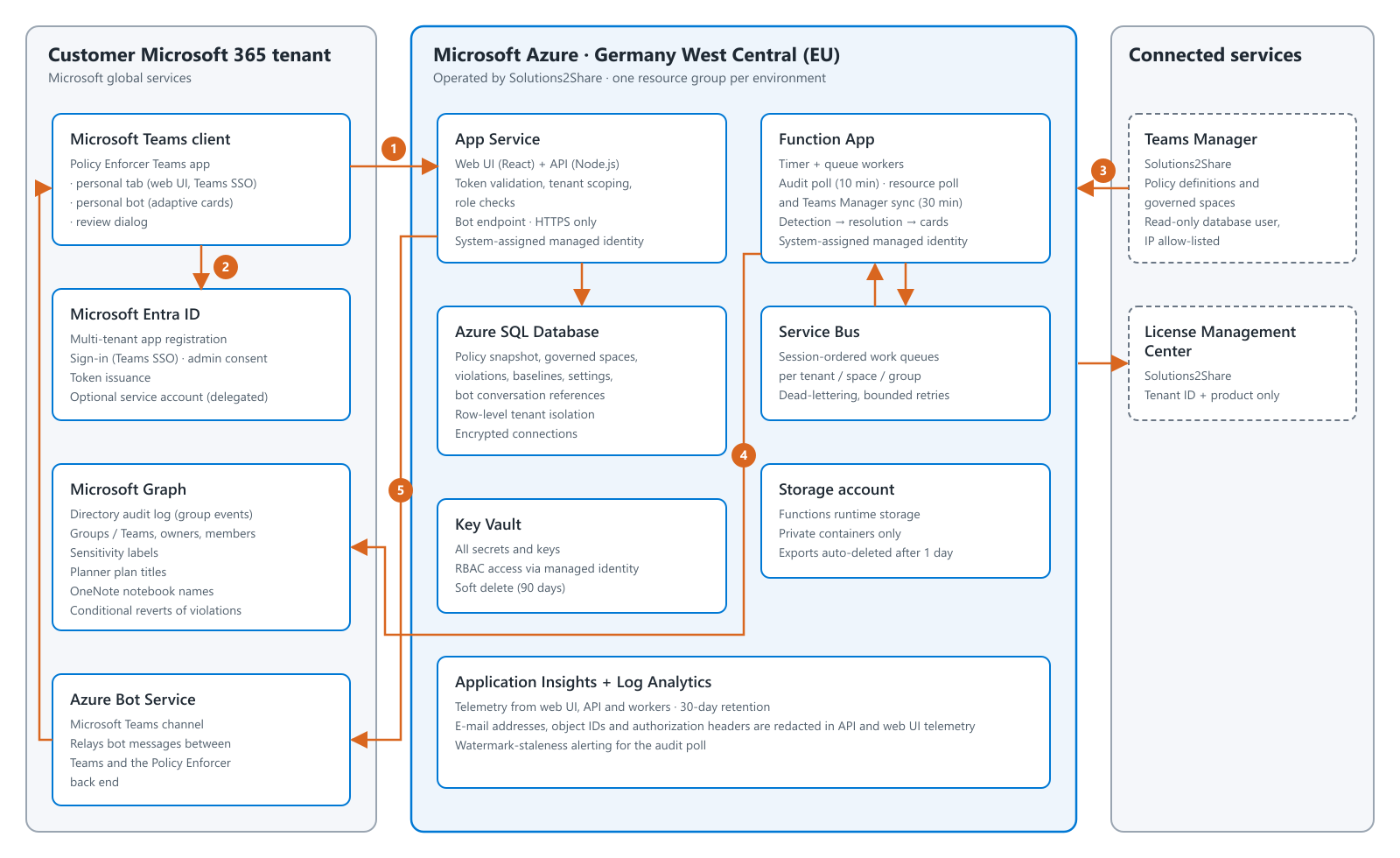
Data flow: (1) a user opens the Policy Enforcer app in Microsoft Teams, which loads the web UI from App Service and calls its API; (2) the user is signed in with Teams single sign-on and every API request carries a Microsoft Entra token that the API validates (signature, issuer, audience, tenant); (3) every 30 minutes the policy definitions and governed spaces are synchronised read-only from Teams Manager, using a read-only database account whose access is restricted to the Policy Enforcer service’s network addresses; (4) every 10 minutes the Function App reads new group-management events from the directory audit log through Microsoft Graph, evaluates them against the policies over Service Bus queues, stores detected violations in Azure SQL and — where the administrator has chosen automatic resolution — restores the last known-good value through Microsoft Graph, after first checking that the value has not changed again in the meantime; (5) Policy Enforcer sends or updates an adaptive card through the Azure Bot Service, and the reviewer accepts a resolution or dismisses the violation in the review dialog. All compute emits telemetry to Application Insights and Log Analytics.
Policy Enforcer uses three deliberately separated authentication flows on one multi-tenant Microsoft Entra app registration:
- Sign-in (delegated). Users sign in with their Microsoft work account through Teams single sign-on. The API accepts only tokens issued for the Policy Enforcer app and derives the tenant from the validated token.
- Background processing (application). After admin consent, background workers obtain application tokens for the customer’s tenant. The app credential is stored in Azure Key Vault and is never sent to the browser; the browser never receives a Microsoft Graph token.
- Service account (delegated, optional). For the few operations listed under Microsoft Graph, a tenant administrator connects a dedicated service account. Its refresh token is encrypted with AES-256-GCM and bound to the tenant; tokens are requested per operation with the minimum scope needed.
Per-tenant isolation is enforced by the tenant identifier carried in every token: each request is scoped to the tenant of its validated token, every tenant-owned record carries that tenant identifier, and Graph tokens are issued per tenant. Within a tenant, access is role-based: only Teams Manager administrators can configure Policy Enforcer, and group owners can review violations of the spaces they own when this is enabled. All secrets are held in Azure Key Vault and read by the services through their system-assigned managed identities; all endpoints are HTTPS-only and the database connection is encrypted.
Resource Endpoints
Domains that a customer’s network or browser must be able to reach.
| Name | Comments |
|---|---|
app-pe-prod.azurewebsites.net | The Policy Enforcer web UI, its API and real-time updates (WebSocket), loaded inside Microsoft Teams. |
login.microsoftonline.com | Microsoft Entra ID — sign-in, admin consent and OAuth token issuance (browser and backend). |
*.applicationinsights.azure.com | Azure Application Insights — diagnostic telemetry from the web UI (browser). |
Backend service egress (informational)
Outbound calls made by the Solutions2Share-operated backend. These are not customer-configurable and are listed for transparency.
| Name | Comments |
|---|---|
graph.microsoft.com | Microsoft Graph — audit-log reads, group reads and policy reverts. |
smba.trafficmanager.net | Azure Bot Service (Bot Framework connector for Microsoft Teams) — delivery of Teams notifications. |
s2slicensing.azurewebsites.net | Solutions2Share License Management Center — product entitlement validation (tenant ID and product name only). |
*.database.windows.net | Azure SQL Database — Policy Enforcer data store and read-only Teams Manager connection. |
*.servicebus.windows.net | Azure Service Bus — background work queues. |
*.vault.azure.net | Azure Key Vault — secrets and keys. |
*.blob.core.windows.net, *.queue.core.windows.net, *.table.core.windows.net | Azure Storage — background-worker runtime storage. |
Dependencies
Third-party libraries used by Policy Enforcer. Versions reflect the current release.
Server
| Name | Version | Url | License |
|---|---|---|---|
| @azure/functions | 4.16.0 | npmjs.com/package/@azure/functions | MIT |
| @azure/identity | 4.13.1 | npmjs.com/package/@azure/identity | MIT |
| @azure/keyvault-secrets | 4.11.2 | npmjs.com/package/@azure/keyvault-secrets | MIT |
| @azure/monitor-opentelemetry | 1.18.0 | npmjs.com/package/@azure/monitor-opentelemetry | MIT |
| @azure/msal-node | 5.2.2 / 2.16.3 | npmjs.com/package/@azure/msal-node | MIT |
| @azure/service-bus | 7.9.5 | npmjs.com/package/@azure/service-bus | MIT |
| @azure/storage-blob | 12.31.0 | npmjs.com/package/@azure/storage-blob | MIT |
| @microsoft/microsoft-graph-client | 3.0.7 | npmjs.com/package/@microsoft/microsoft-graph-client | MIT |
| @nestjs/axios | 4.0.1 | npmjs.com/package/@nestjs/axios | MIT |
| @nestjs/cache-manager | 3.1.2 | npmjs.com/package/@nestjs/cache-manager | MIT |
| @nestjs/common | 11.1.24 | npmjs.com/package/@nestjs/common | MIT |
| @nestjs/config | 4.0.4 | npmjs.com/package/@nestjs/config | MIT |
| @nestjs/core | 11.1.24 | npmjs.com/package/@nestjs/core | MIT |
| @nestjs/platform-express | 11.1.24 | npmjs.com/package/@nestjs/platform-express | MIT |
| @nestjs/platform-socket.io | 11.1.24 | npmjs.com/package/@nestjs/platform-socket.io | MIT |
| @nestjs/serve-static | 5.0.5 | npmjs.com/package/@nestjs/serve-static | MIT |
| @nestjs/websockets | 11.1.24 | npmjs.com/package/@nestjs/websockets | MIT |
| @opentelemetry/api | 1.9.1 | npmjs.com/package/@opentelemetry/api | Apache-2.0 |
| @opentelemetry/api-logs | 0.208.0 | npmjs.com/package/@opentelemetry/api-logs | Apache-2.0 |
| @prisma/adapter-mssql | 7.8.0 | npmjs.com/package/@prisma/adapter-mssql | Apache-2.0 |
| @prisma/client | 7.8.0 | npmjs.com/package/@prisma/client | Apache-2.0 |
| @sendgrid/mail | 8.1.6 | npmjs.com/package/@sendgrid/mail | MIT |
| async-mutex | 0.5.0 | npmjs.com/package/async-mutex | MIT |
| axios | 1.16.1 | npmjs.com/package/axios | MIT |
| botbuilder | 4.23.3 | npmjs.com/package/botbuilder | MIT |
| botframework-connector | 4.23.3 | npmjs.com/package/botframework-connector | MIT |
| cache-manager | 7.2.8 | npmjs.com/package/cache-manager | MIT |
| class-transformer | 0.5.1 | npmjs.com/package/class-transformer | MIT |
| class-validator | 0.15.1 | npmjs.com/package/class-validator | MIT |
| dotenv | 17.4.2 | npmjs.com/package/dotenv | BSD-2-Clause |
| durable-functions | 3.3.1 | npmjs.com/package/durable-functions | MIT |
| http-proxy-middleware | 3.0.5 | npmjs.com/package/http-proxy-middleware | MIT |
| jose | 6.2.3 | npmjs.com/package/jose | MIT |
| mssql | 12.5.4 | npmjs.com/package/mssql | MIT |
| prisma | 7.8.0 | npmjs.com/package/prisma | Apache-2.0 |
| reflect-metadata | 0.2.2 | npmjs.com/package/reflect-metadata | Apache-2.0 |
| rxjs | 7.8.2 | npmjs.com/package/rxjs | Apache-2.0 |
| socket.io | 4.8.3 | npmjs.com/package/socket.io | MIT |
Client Packages
| Name | Version | Url | License |
|---|---|---|---|
| @azure/msal-browser | 5.11.0 | npmjs.com/package/@azure/msal-browser | MIT |
| @fluentui/react-components | 9.73.8 | npmjs.com/package/@fluentui/react-components | MIT |
| @fluentui/react-icons | 2.0.328 | npmjs.com/package/@fluentui/react-icons | MIT |
| @microsoft/applicationinsights-web | 3.4.1 | npmjs.com/package/@microsoft/applicationinsights-web | MIT |
| @microsoft/teams-js | 2.53.0 | npmjs.com/package/@microsoft/teams-js | MIT |
| @reduxjs/toolkit | 2.12.0 | npmjs.com/package/@reduxjs/toolkit | MIT |
| @tanstack/react-query | 5.100.14 | npmjs.com/package/@tanstack/react-query | MIT |
| axios | 1.16.1 | npmjs.com/package/axios | MIT |
| i18next | 26.2.0 | npmjs.com/package/i18next | MIT |
| i18next-browser-languagedetector | 8.2.1 | npmjs.com/package/i18next-browser-languagedetector | MIT |
| react | 19.2.5 | npmjs.com/package/react | MIT |
| react-dom | 19.2.5 | npmjs.com/package/react-dom | MIT |
| react-i18next | 17.0.8 | npmjs.com/package/react-i18next | MIT |
| react-image-crop | 11.0.10 | npmjs.com/package/react-image-crop | ISC |
| react-pdf | 10.4.1 | npmjs.com/package/react-pdf | MIT |
| react-redux | 9.3.0 | npmjs.com/package/react-redux | MIT |
| react-router-dom | 7.15.1 | npmjs.com/package/react-router-dom | MIT |
| socket.io-client | 4.8.3 | npmjs.com/package/socket.io-client | MIT |
Build and test tooling
Used only to build and test the app; not shipped to the browser or deployed to the server.
| Name | Version | Url | License |
|---|---|---|---|
| @rsbuild/core | 1.7.5 | npmjs.com/package/@rsbuild/core | MIT |
| @rsbuild/plugin-react | 1.4.6 | npmjs.com/package/@rsbuild/plugin-react | MIT |
| @nestjs/cli | 11.0.21 | npmjs.com/package/@nestjs/cli | MIT |
| @nestjs/testing | 11.1.24 | npmjs.com/package/@nestjs/testing | MIT |
| typescript | 5.9.3 | npmjs.com/package/typescript | Apache-2.0 |
| @typescript/native-preview | 7.0.0-dev | npmjs.com/package/@typescript/native-preview | Apache-2.0 |
| ts-node | 10.9.2 | npmjs.com/package/ts-node | MIT |
| tsx | 4.22.3 | npmjs.com/package/tsx | MIT |
| tailwindcss | 4.3.0 | npmjs.com/package/tailwindcss | MIT |
| @tailwindcss/postcss | 4.3.0 | npmjs.com/package/@tailwindcss/postcss | MIT |
| jest | 30.4.2 / 29.7.0 | npmjs.com/package/jest | MIT |
| ts-jest | 29.4.11 | npmjs.com/package/ts-jest | MIT |
| jest-environment-jsdom | 30.4.1 | npmjs.com/package/jest-environment-jsdom | MIT |
| jest-axe | 10.0.0 | npmjs.com/package/jest-axe | MIT |
| @testing-library/react | 16.3.2 | npmjs.com/package/@testing-library/react | MIT |
| @testing-library/jest-dom | 6.9.1 | npmjs.com/package/@testing-library/jest-dom | MIT |
| @testing-library/user-event | 14.6.1 | npmjs.com/package/@testing-library/user-event | MIT |
| msw | 2.14.6 | npmjs.com/package/msw | MIT |
| undici | 6.27.0 | npmjs.com/package/undici | MIT |
| supertest | 7.2.2 | npmjs.com/package/supertest | MIT |
| @playwright/test | 1.61.0 | npmjs.com/package/@playwright/test | Apache-2.0 |
| @axe-core/playwright | 4.12.1 | npmjs.com/package/@axe-core/playwright | MPL-2.0 |
| eslint | 9.39.4 | npmjs.com/package/eslint | MIT |
| typescript-eslint | 8.59.4 | npmjs.com/package/typescript-eslint | MIT |
| prettier | 3.8.3 | npmjs.com/package/prettier | MIT |
Policy Enforcer uses no third-party analytics or advertising trackers. The Policy Enforcer back end sends customer data only to Microsoft/Azure services and the Solutions2Share License Management Center.