
Teams Manager
We want our customers to be confident and aware of our data collection practices when using Teams Manager.
Note
The content on this page is subject to change. We recommend that you check back quarterly for updates.
Microsoft 365 Certified
We undergo independent annual audits with a strong focus on application security, operational security, and data handling, including privacy controls. Our compliance is assessed against industry standards such as SOC 2, PCI DSS, and ISO 27001. Comprehensive internal and external vulnerability tests are conducted quarterly, with all resulting reports thoroughly reviewed to ensure the ongoing security and integrity of our systems.
Data Management Practices
Through its different features, Teams Manager accesses, processes, and stores several kinds of data:
- Authentication
- Team/Group/Site data
- User data
- Teams data
- OneDrive data
Here is how we’re managing data for these different categories:
| Data | Accessed | Cached | Stored | Notes |
| Authentication | ✔ | ✔ | ✔ | Accesstokens are generated for both Application and Delegated. Permission Accesstokens are cached for up to 45m Refreshtoken to generate Yammer. Accesstoken is stored in the database. |
| Team/Group/Site data | ✔ | 🚫 | ✔ | ID of Teams/Groups/Sites is stored in the database. |
| Site data | ✔ | 🚫 | ✔ | Lists, ContentTypes, Columns and Listitems are stored in the database for each template. |
| User data | ✔ | ✔ | ✔ | Users data (AAD ID, UPN). UPN is cached for up to 2h. AAD ID and ID assigned from the Bot are stored in the database. |
| Teams channel | ✔ | 🚫 | ✔ | Name and unique ID of the channel and Name, ID and Configuration of the Tabs. No cache. Stored as long as the organization is active for each template. |
| Teams conversations | ✔ | 🚫 | ✔ | Bot sends messages in Teams and sends Adaptive Cards to users. ID of adaptive Card is stored. |
| OneDrive data | ✔ | 🚫 | ✔ | Files and Documents are accessed. No cache. Files and Documents are stored in the Database for each template. |
Microsoft Graph
| Scope | Description | Justification | Admin Consent Required | Type |
User.Read | Retrieve the properties and relationships of the logged in user object. | Allows to get the logged in user. | No | Delegated |
Community.ReadWrite.All | Read and write all Viva Engage communities | Allows the app to create Viva Engage communities, read all community properties, update community properties, and delete communities without a signed-in user. | Yes | Application |
Directory.Read.All | Retrieve the properties of the organization. | Allows getting the verified domains of the organization for getting the accesstoken. | Yes | Delegated |
Group.ReadWrite.All | Retrieve and update the properties of the Group object. | Allows for getting and updating the groups the logged in user has access to. | Yes | Delegated |
Group.ReadWrite.All | Retrieve and update the properties of the Group object. | Allows for getting and updating groups without user access (e.g. lifecycle). | Yes | Application |
InformationProtectionPolicy.Read | Retrieve the properties and relationships of the information protection policy object. | Allows getting the sensitivity labels. | Yes | Application |
Mail.Send | Allows to send mails from the user. | Allows for sending the lifecycle mail notifications. | Yes | Application |
Notes.ReadWrite.All | Read and write all OneNote notebooks that user can access | Allows the app to read, share, and modify OneNote notebooks that the signed-in user has access to in the organization. | No | Delegated |
Sites.FullControl.All | Update content for SharePoint sites. | Allows for provisioning of lists, columns and content types. | Yes | Application |
Sites.ReadWrite.All | Retrieve and update the SharePoint site and oneDrive objects. | Allows for updating the oneDrive and creating list items. | Yes | Application |
TeamsActivity.Send | Send Teams activities to users. | Allows for sending activities to users. | Yes | Application |
User.Read.All | Retrieve the properties of user objects. | Allows for getting the user data of all users. | Yes | Application |
User.Read.All | Retrieving the properties of the logged In user object. | Getting the joined Teams of the user. | Yes | Delegated |
User.ReadBasic.All | Retrieve the basic properties of the user object. | Allows for getting the basic information of the user. | No | Delegated |
AppCatalog.Read.All | Retrieves the app from the store | Navigation from Adaptive Card into the app | Yes | Application |
ChannelMember.ReadWrite.All | To be able to add users to channels (private and shared only) | Channel application possible in Teams Manager | Yes | Application |
Directory.ReadWrite.All (optional) | Retrieve and update the directory. | Allows for disabling the guest access for teams. | Yes | Application |
Sites.Read.All (optional) | Retrieve the properties of the SharePoint sites. | Allows for getting the SharePoint sites the user has access to. | No | Delegated |
EduRoster.ReadWrite.All (optional) | Retrieve and update the users in education classes. | Allows for updating the owners and members of classes. | Yes | Application |
Member.Read.Hidden (optional) | Retrieve hidden memberships of users In groups. | Allows for getting the owners and members of classes and PLC. | Yes | Application |
SharePoint Permissions
| Scope | Description | Justification | Admin Consent Required | Type |
Sites.ReadWrite.All | Retrieve and update the properties in site collections. | Allows to provision folders and creating of SharePoint site collections. | Yes | Application |
Sites.FullControl.All (optional) | Have full control of site collections. | Allows for updating the SharePoint site through the SharePoint REST API. | Yes | Application |
Yammer Permissions
| Scope | Description | Justification | Admin Consent Required | Type |
User_impersonation (optional) | Read and write to the yammer plattform. | Allows to create Yammer Communities. | No | Delegated |
Microsoft Teams Apps Security And Compliance
To provide organizations with the information they need to accelerate and inform decisions about the Microsoft Teams apps and add-ins they use, Microsoft works with our Microsoft 365 developer partners. This information is supplemented by information from the Microsoft Cloud App Security app catalog and information provided by developers when they submit their apps. This security, data handling and compliance information is intended to help organizations assess and manage the risks of using these apps.
Note
Architecture And Flow Diagram
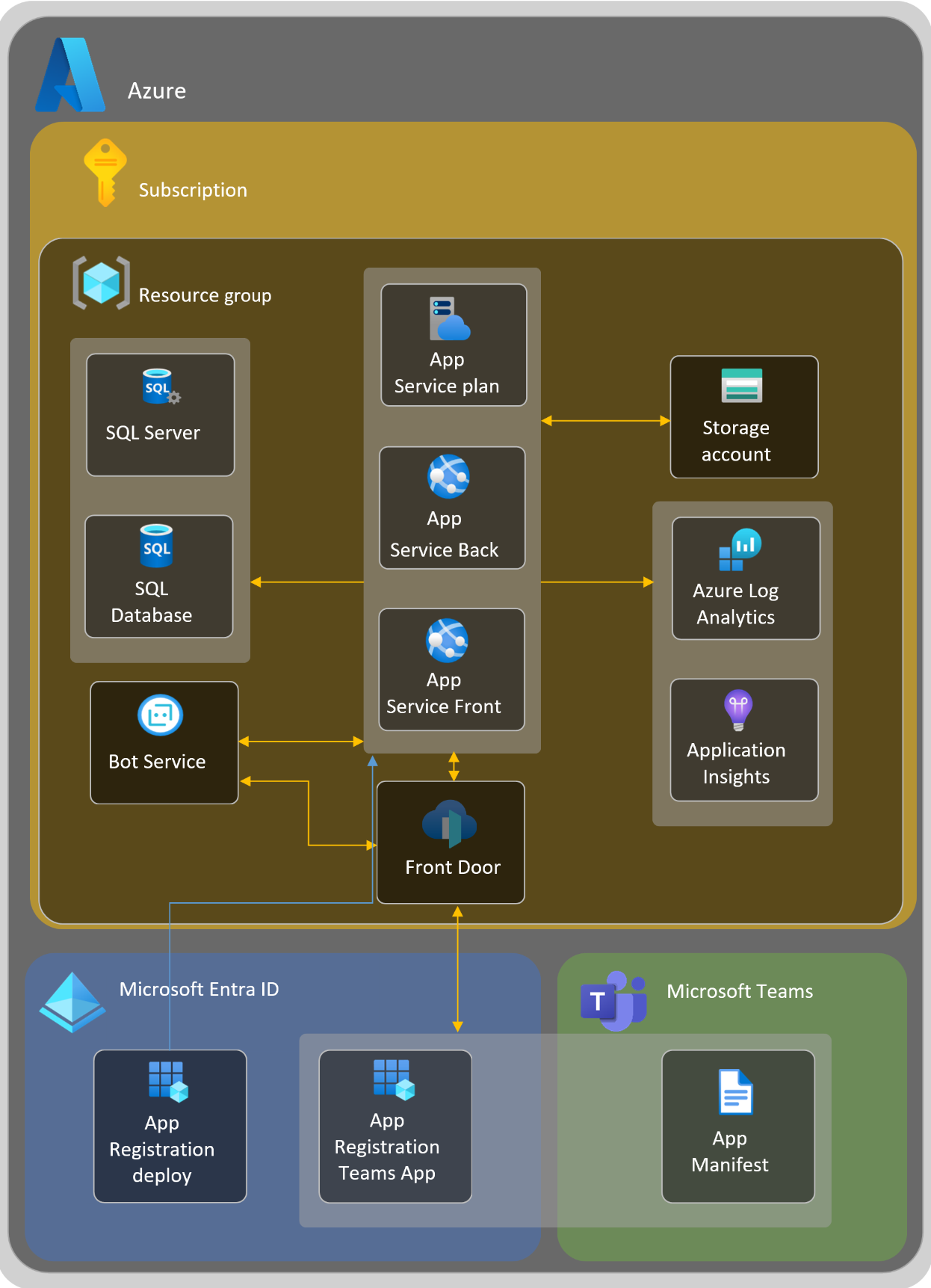
Resource Endpoints
All the traffic from and to the Teams Manager platform uses HTTPS protocol on port 443. Here is a short description of each flow:
| Name | Comments |
|---|---|
| .msecnd.net and *.visualstudio.com | for performance metrics analysis |
Dependencies
Teams Manager is built on widely used frameworks and Microsoft SDKs. A full package and version list is not published here.
Third-party components
- Back end: .NET with ASP.NET MVC and Web API, background processing with Azure WebJobs; data in Azure Storage (Blob, Queue, Table) and a Redis cache.
- Web UI: React with Fluent UI, running inside Microsoft Teams through the Microsoft Teams JavaScript library.
- Microsoft 365 integration: Microsoft Graph SDK, Microsoft Authentication Library (MSAL) and the Bot Framework SDK.
- Monitoring: Azure Application Insights.